SOPs
Printlab Processing Days and Pickup Schedule
Videos (0) Ask a question about this SOP
Printlab Processing Days and Pickup Schedule
Language: English only
Status: Draft — taken from the source chart; not separately re-approved as a Printlab-official SOP
Draft date: 13 Nov 2026 (Asia/Kuala_Lumpur)
Applies to: CS / Sales when quoting and setting the collect day; Designer when judging a processing-day issue; Production for lead time; Packing & QC and branch staff for collection
Source: Processing Day Aug-2026-Version V5.png (Google Drive, Customer Service (CS) / Sales Department folder, files by David Ng). Title on the chart: “ORDER & PICK UP SCHEDULE - EASY GUIDE”.
Related drafts: cs-sales-sop.md, designer-sop.md, production-sop.md, packing-qc-sop.md, cs-sales-check-order-status.md, cs-sales-terms.md.
The tables below transcribe the August 2026 Version V5 chart, except for the cut-off time. Vincent confirmed on 13 Nov 2026 (Asia/Kuala_Lumpur) that the cut-off is now 5PM only; the old 4PM cut-off no longer applies. The chart image still shows 4PM — that label is superseded. Saturday, Sunday and public holidays are not working days. Artwork must already be approved when this cut-off is applied. Anything still not stated is marked [TO CONFIRM].
1. Purpose
- Give staff one English copy of the current processing-day and pickup schedule, including the 5PM cut-off.
- So CS can tell the customer the processing days and cut-off time when quoting (Customer_Service_SOP 3.4.xlsx, rule 23.0).
- So Designer and CS have a published schedule to use if a processing-day issue is raised.
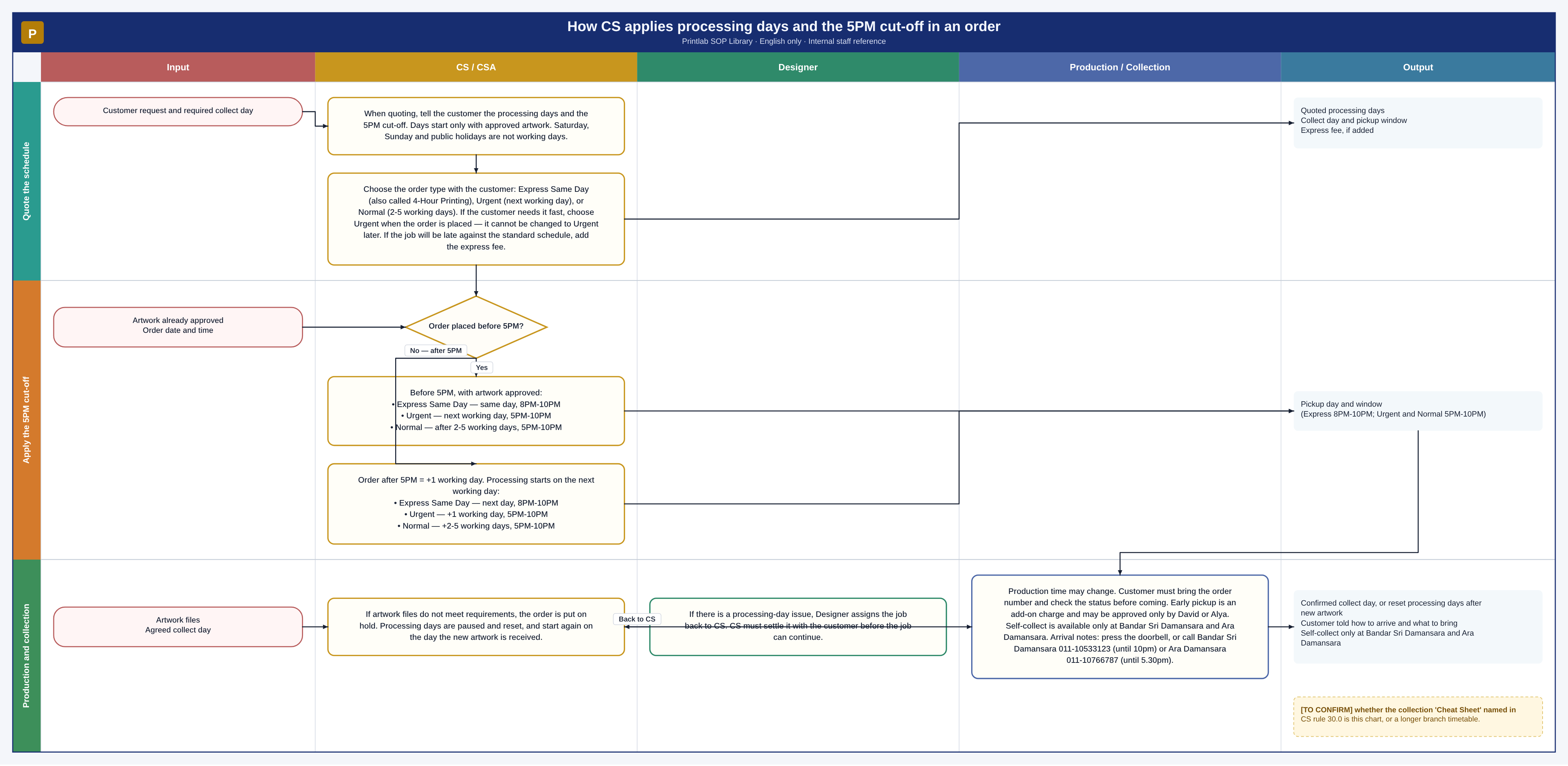
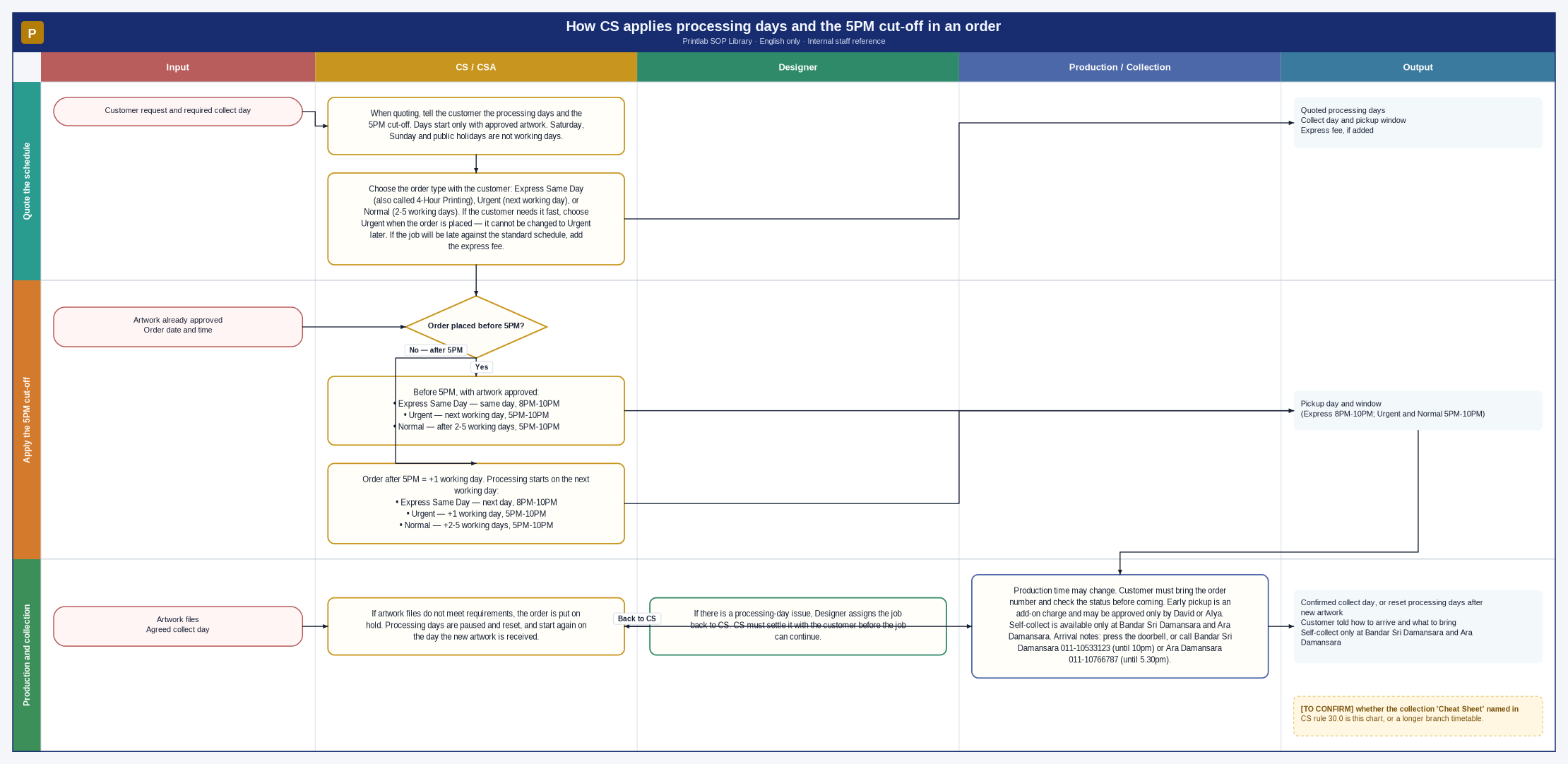
Workflow diagram
Tap or click the diagram for a larger view, or use the download links. On a phone, open the PNG to zoom and pan.
2. The official chart
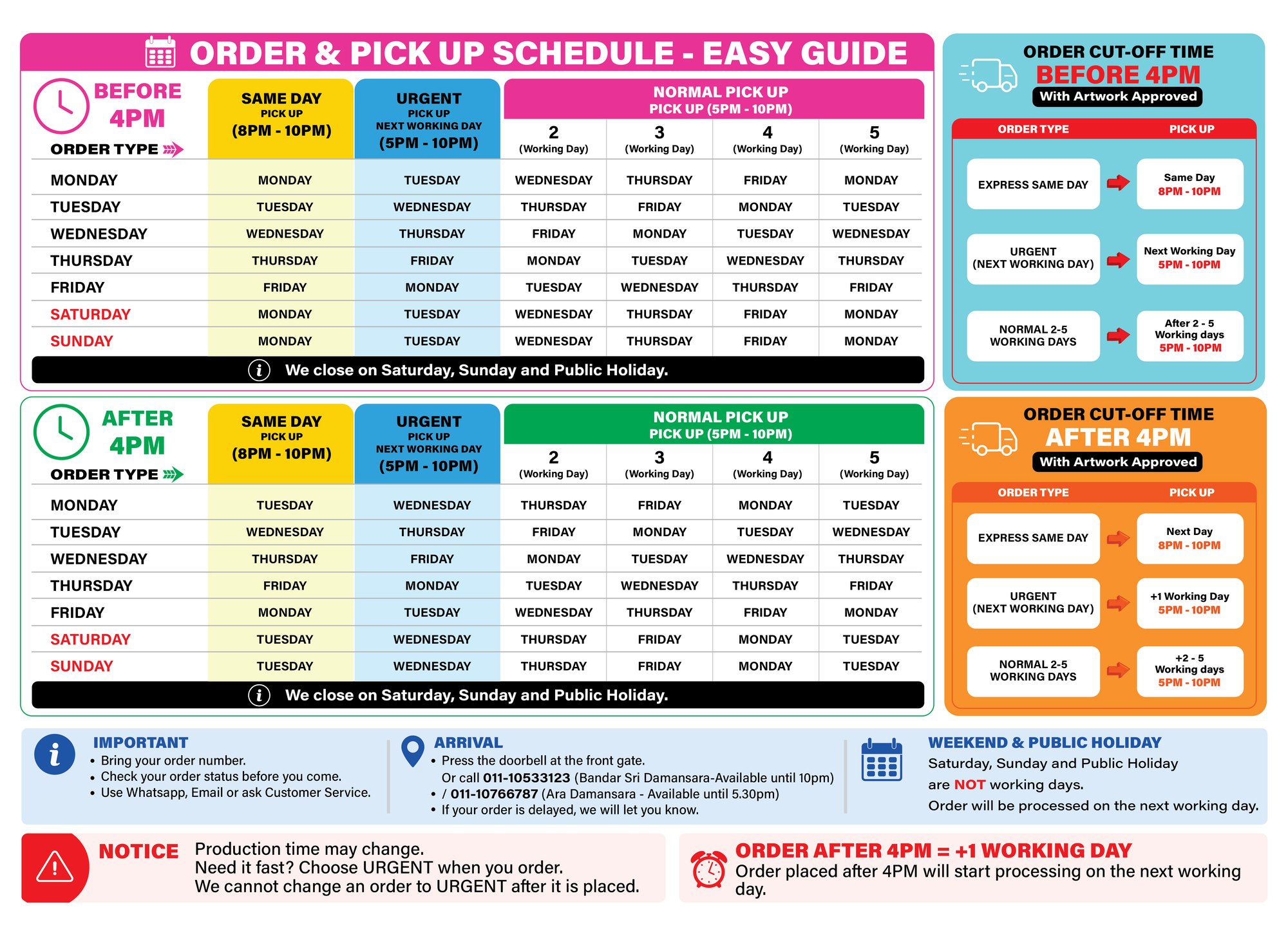
Click the image for a larger view. The August 2026 Version V5 chart still shows a 4PM cut-off. That time was superseded on 13 Nov 2026: the cut-off is now 5PM only. Use the chart for pickup days and collection windows, but read every “4PM” on the image as 5PM. The tables and text below already use 5PM.
3. Cut-off and order types
All of the times below assume artwork is already approved.
Order after 5PM = +1 working day. An order placed after 5PM starts processing on the next working day. (The chart image still says 4PM; that cut-off was superseded on 13 Nov 2026.)
Saturday, Sunday and public holidays are not working days. The order is processed on the next working day. The shop is closed on those days.
Pickup windows:
| Order type | Pickup window |
|---|---|
| Express / Same day | 8PM–10PM |
| Urgent (next working day) | 5PM–10PM |
| Normal, 2–5 working days | 5PM–10PM |
Before 5PM, with artwork approved:
| Order type | Pickup |
|---|---|
| Express same day | Same day, 8PM–10PM |
| Urgent (next working day) | Next working day, 5PM–10PM |
| Normal, 2–5 working days | After 2–5 working days, 5PM–10PM |
After 5PM, with artwork approved:
| Order type | Pickup |
|---|---|
| Express same day | Next day, 8PM–10PM |
| Urgent (next working day) | +1 working day, 5PM–10PM |
| Normal, 2–5 working days | +2–5 working days, 5PM–10PM |
Notice on the chart
- Production time may change.
- Need it fast? Choose Urgent when you order.
- We cannot change an order to Urgent after it is placed.
Related CS rules (Customer_Service_SOP 3.4.xlsx), not printed on this chart
- Tell the customer the processing days and cut-off time when quoting. If the job will be late, add the express fee. (rule 23.0)
- Express Same Day is also called 4-Hour Printing. It starts after payment and the design is confirmed (rule 2.0), except that a 14-day credit-term job may be printed before payment clears, once the design is confirmed.
- The payment-slip rule for creating the order also uses a 5PM cut-off (rule 10.0). Vincent confirmed on 13 Nov 2026 that the processing cut-off is now the same 5PM; the 4PM cut-off on the chart no longer applies.
- Early pickup is an add-on charge (Printlab SOP.jpeg, clause 8) and may be approved only by David or Alya (rule 30.0).
- Collection times are also referred to as being “in the Cheat Sheet” (rule 30.0). That Cheat Sheet was not in the Drive folder. [TO CONFIRM] whether it is this chart or a longer branch timetable.
If artwork files do not meet requirements, processing days are paused and reset, and start again on the day the new artwork is received (Printlab SOP.jpeg, clause 12).
4. Before 5PM schedule
Pickup day for an order placed before 5PM, with artwork approved.
| Order day | Same day (8PM–10PM) | Urgent, next working day (5PM–10PM) | Normal 2 working days | Normal 3 working days | Normal 4 working days | Normal 5 working days |
|---|---|---|---|---|---|---|
| Monday | Monday | Tuesday | Wednesday | Thursday | Friday | Monday |
| Tuesday | Tuesday | Wednesday | Thursday | Friday | Monday | Tuesday |
| Wednesday | Wednesday | Thursday | Friday | Monday | Tuesday | Wednesday |
| Thursday | Thursday | Friday | Monday | Tuesday | Wednesday | Thursday |
| Friday | Friday | Monday | Tuesday | Wednesday | Thursday | Friday |
| Saturday | Monday | Tuesday | Wednesday | Thursday | Friday | Monday |
| Sunday | Monday | Tuesday | Wednesday | Thursday | Friday | Monday |
5. After 5PM schedule
Pickup day for an order placed after 5PM, with artwork approved. Processing starts on the next working day.
| Order day | Same day (8PM–10PM) | Urgent, next working day (5PM–10PM) | Normal 2 working days | Normal 3 working days | Normal 4 working days | Normal 5 working days |
|---|---|---|---|---|---|---|
| Monday | Tuesday | Wednesday | Thursday | Friday | Monday | Tuesday |
| Tuesday | Wednesday | Thursday | Friday | Monday | Tuesday | Wednesday |
| Wednesday | Thursday | Friday | Monday | Tuesday | Wednesday | Thursday |
| Thursday | Friday | Monday | Tuesday | Wednesday | Thursday | Friday |
| Friday | Monday | Tuesday | Wednesday | Thursday | Friday | Monday |
| Saturday | Tuesday | Wednesday | Thursday | Friday | Monday | Tuesday |
| Sunday | Tuesday | Wednesday | Thursday | Friday | Monday | Tuesday |
6. Arrival and collection notes (from the chart)
Important
- Bring your order number.
- Check your order status before you come.
- Use WhatsApp, email, or ask Customer Service.
How to check the status on printlab.com.my is in cs-sales-check-order-status.md. Self-collect also needs the order number, or the job is not released (Customer_Service_SOP 3.4.xlsx, rule 29.0).
Arrival
- Press the doorbell at the front gate.
- Or call 011-10533123 (Bandar Sri Damansara — available until 10pm).
- Or call 011-10766787 (Ara Damansara — available until 5.30pm).
- If the order is delayed, Printlab will let the customer know.
Self-collect is only available at Bandar Sri Damansara and Ara Damansara (Vincent, 13 Nov 2026). Bandar Sri Damansara is the KL collection point already named on this chart. Other branches named on the 2018 T&C photo (Kuala Terengganu, KG Tiong, Kota Bharu, Kuantan, Penang) are not self-collect points. Rule 27.0 also names “KL / Kuala Terengganu / Ara Damansara”; the Kuala Terengganu self-collect mention is superseded by this confirmation.
7. Checklist for CS when quoting
- Customer was told the processing days and the 5PM cut-off
- Artwork-approved timing was explained (days start only with approved artwork)
- Weekend and public-holiday days were not counted as working days
- Urgent was chosen at the time of order if the customer needs it; it will not be changed later
- Express fee added if the requested day is later than the standard schedule (rule 23.0)
- Collect day matches this chart, and the customer was told the 8PM–10PM or 5PM–10PM window
Progress is saved on this device for version 0.5.
7. Checklist for CS when quoting
Videos
No videos yet