SOPs
Printlab Customer Service / Sales Department SOP
Videos (0) Ask a question about this SOP
Printlab Customer Service / Sales Department SOP
Language: English only
Status: Draft — not yet confirmed as a Printlab-official SOP
Draft date: 13 Nov 2026 (Asia/Kuala_Lumpur)
Applies to: Customer Service (CS), Customer Service Assistants (CSA), branch CS, and the named sales persons below, for Printlab custom-print orders
How to read this draft: the custom-order path, the statuses Pending Payment, Complete Payment, Pending Artwork, Order Processing and Order Complete, the Maybank Checker step, Ms Norhan, and the credit-terms exception (Wendy Wong, Andy Lau and David Ng only) come from Vincent’s description on 13 Nov 2026 (Asia/Kuala_Lumpur). Later the same day he confirmed: the 1 Nov 2018 T&C photo is still current; Ara Damansara is the correct spelling (the photo’s “Ara Damasara” is a typo); Order Complete means Ready for Collect or Ship Out; Account is Finance Admin, Ms Norhan; CS Team Leaders are Lysha (A), Izzat (B) and Faiz (C); 4-Hour Printing is Express Same Day; quotes are valid for 7 days; credit terms are 14 days and those jobs may be printed before payment clears; Designer changes Pending Artwork to Order Processing after the client confirms the artwork; and the processing cut-off is now 5PM only (the 4PM cut-off on the August 2026 chart no longer applies). Later still the same day he confirmed: a Pending Payment job may stay open for a maximum of 3 days, and the CS team leader or Finance Admin (Ms Norhan) changes the job-order status; after a Cancellation Request, David Ng investigates, Ms Norhan does finance verification, and Jensen gives the approval; a standard ground-floor sticker installation in Selangor, Penang, Johor or Terengganu needs David to check the supplier cost price; and self-collect is only available at Bandar Sri Damansara and Ara Damansara. Operational CS rules also come from the Drive files listed under Sources. Where a point is answered, it is no longer marked [TO CONFIRM]. Remaining differences are listed under Conflicts. Anything still not stated is marked [TO CONFIRM].
Sources used
| Source | Date | What was taken from it |
|---|---|---|
| Vincent’s description of the Printlab custom-order flow, and later confirmations the same day | 13 Nov 2026 (Asia/Kuala_Lumpur) | Quote sources, payment and credit-term rules (14 days; may print before payment clears), 7-day quote validity, job statuses (including Pending Artwork and Order Processing), Maybank Checker, Finance Admin Ms Norhan, CS Team Leaders Lysha / Izzat / Faiz, Order Complete = Ready for Collect or Ship Out, T&C still current, 4-Hour Printing = Express Same Day, 5PM cut-off, Pending Payment maximum of 3 days (team leader or Ms Norhan changes the status), cancellation and refund path (David Ng investigates, Ms Norhan verifies, Jensen approves), David checks supplier cost price for standard ground-floor sticker installation in Selangor, Penang, Johor or Terengganu, self-collect only at Bandar Sri Damansara and Ara Damansara |
| CS WORKFLOW REMINDER.pdf (Drive) | Effective date on document: “Starting today”; PDF created 15 Nov 2025, 9:57:27 AM (Asia/Kuala_Lumpur) | CS must log every workflow change in the order-status comments on printlab.com.my |
| Customer_Service_SOP 3.4.xlsx (Drive, David Ng) | Update date in the workbook: 13 Nov 2026 | Internal CS rules 1.0–56.0: quoting, payment slips, invoices, order creation, WhatsApp groups, artwork-approval template, delivery, cancellation, and staff rules |
| Printlab SOP.jpeg (Drive, David Ng) | “Starting from 1 Nov 2018 onwards” on the image | Customer-facing S.O.P. / T&C wording that CS must send as a photo with the quotation (rule 6.0) |
| Processing Day Aug-2026-Version V5.png (Drive, David Ng) | August 2026, Version V5; cut-off superseded 13 Nov 2026 | Order cut-off is now 5PM (the chart image still shows 4PM, superseded). Same-day / urgent / normal pickup schedule, weekend rule, and collection notes |
| CHECK ORDER STATUS .pdf (Drive, David Ng) | PDF created 11 Feb 2025, 3:02 PM (Asia/Kuala_Lumpur) | How the customer checks status on printlab.com.my; portal labels Order Processing and Order Completed (annotated “Ready to Collect”) |
| Installation Sticker SOP 1.1.xlsx (Drive, David Ng) | Updated: 12 Nov 2023; price-check rule updated 13 Nov 2026 | Questions to ask, template fields, and when CS must ask David — see cs-sales-installation-sticker-sop.md. Vincent confirmed on 13 Nov 2026 that a standard ground-floor installation in Selangor, Penang, Johor or Terengganu needs David to check the supplier cost price. |
Related drafts in this folder: order-workflow.md, designer-sop.md, production-sop.md, packing-qc-sop.md, price-sop.md, cs-sales-processing-days.md, cs-sales-terms.md, cs-sales-installation-sticker-sop.md, cs-sales-check-order-status.md.
Older Drive flowcharts on consumables, Canon plotter ink, and marketplace fulfilment are not treated as Printlab custom-print procedure. They are in the appendix, marked Possibly FSM, not Printlab [TO CONFIRM].
1. Purpose
- Give CS and Sales a single English procedure for a Printlab custom-print order, from quotation and payment through hand-off and final status.
- Make sure every job on printlab.com.my shows a transparent, up-to-date status and comments, so Designer and management can follow the job without asking repeatedly.
- Apply the payment rule: full payment before the order is placed, except for the named sales persons who may handle credit terms.
Workflow diagram
Tap or click the diagram for a larger view, or use the download links. On a phone, open the PNG to zoom and pan.
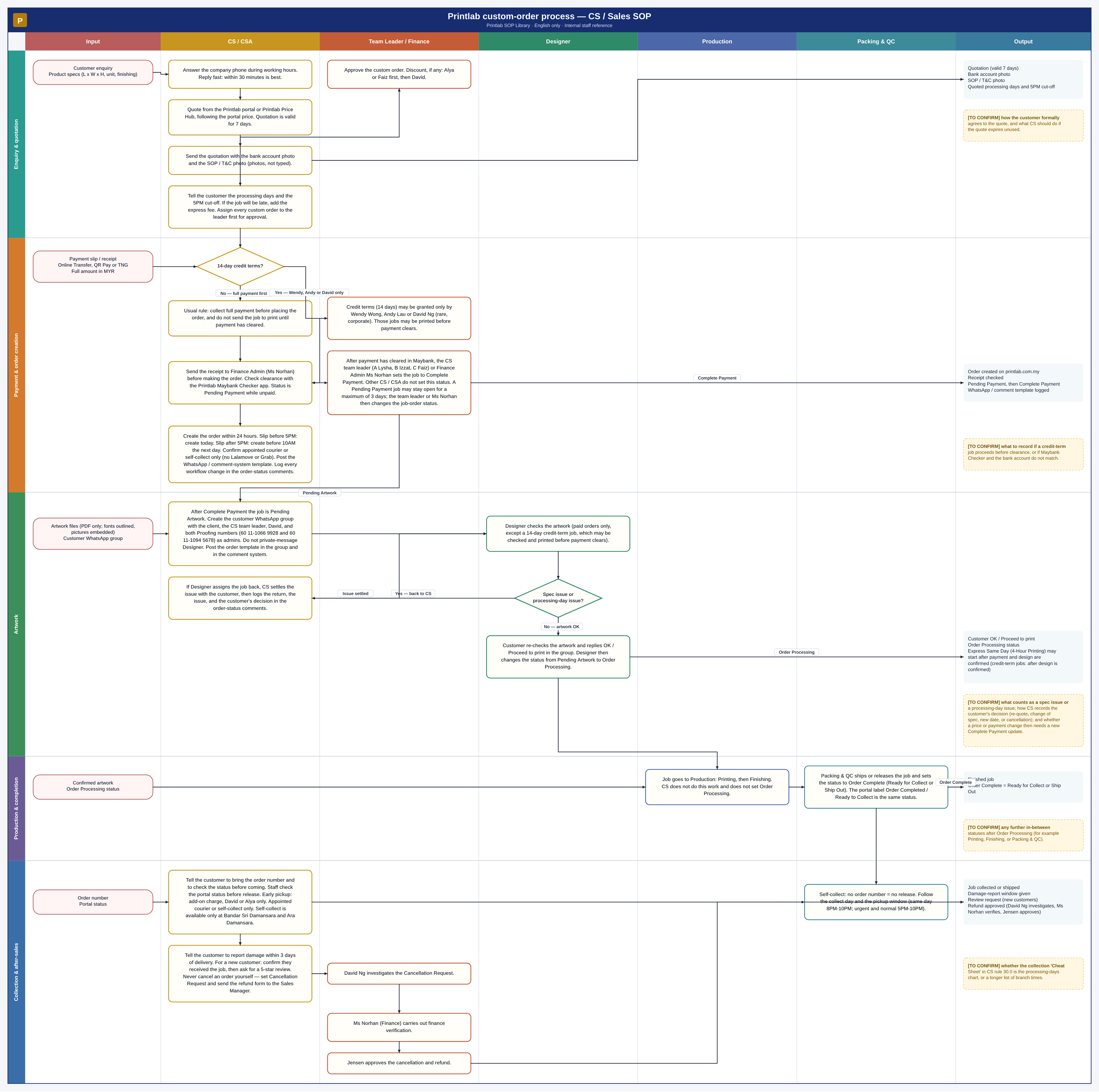
2. Scope
In scope
- Quoting a Printlab custom-print customer from the Printlab portal or the Printlab Price Hub, following the portal price and the quotation rules in section 4.2.
- Collecting payment, sending the receipt or slip to Finance Admin (Ms Norhan), checking that payment has cleared, then arranging the status update to Complete Payment.
- The credit-terms exception for the named sales persons only.
- Logging every workflow change in the order-status comments on printlab.com.my, and posting the compulsory order template in the WhatsApp group and in the comment system.
- Receiving a job back from Designer when there is a spec issue or a processing-day issue, and settling that issue with the customer.
- Telling the customer the processing days and cut-off, confirming courier or self-collect, and pointing the customer to the portal status guide.
- Installation-sticker orders, as summarised in section 4.11 and detailed in
cs-sales-installation-sticker-sop.md. - The CS / Sales part of the path that later goes to Designer, Production (Printing then Finishing), and Packing & QC.
Out of scope (covered in the other department drafts)
- Designer’s artwork check and return-to-CS rule (
designer-sop.md). - Printing and Finishing work (
production-sop.md). - Packing, QC, shipping or release at collection, and the Order Complete / Order Completed status (
packing-qc-sop.md). - Maintaining price lists or the Price Hub itself (
price-sop.md) — CS uses those prices to quote; ownership of the lists is [TO CONFIRM].
Still not stated — [TO CONFIRM]
- The full list of enquiry channels, and the intake fields CS must capture beyond the compulsory template.
- How the customer formally agrees to a quote (the files say what CS must send, not the acceptance method). A quote is valid for 7 days; what happens when it expires is not stated.
- The contents of the “Cheat Sheet” of collection times named in rule 30.0, beyond the August 2026 processing-days chart.
3. Roles
Names and duties below combine Vincent’s 13 Nov 2026 flow and later confirmations the same day with Customer_Service_SOP 3.4.xlsx and the related Drive files. [TO CONFIRM] current role holders only where a name was still not given (for example Sales Manager, and named Designer staff).
| Role | Duties stated |
|---|---|
| CS / CSA / branch CS | Quote from the Printlab portal or the Printlab Price Hub, following the portal price. Collect full payment before placing the order. Must not handle partial payment or credit terms. Send the receipt to Finance Admin (Ms Norhan) and check clearance with the Printlab Maybank Checker app. Create the order within the slip cut-off, log comments, post the WhatsApp / comment-system template, and settle spec or processing-day issues when Designer assigns the job back. |
| Sales persons Wendy Wong, Andy Lau and David Ng | The only people who may grant credit terms or handle partial payment (described as rare, and for corporate customers). Credit terms are 14 days, and those jobs may be printed before payment clears. David is also named in the CS SOP as group admin, final discount approver (after Alya/Faiz), early-pickup approver (with Alya), urgent leave contact (“Mr David”), and the person to tag for installation pricing. After a Cancellation Request, David Ng investigates the cancellation and refund. For a standard ground-floor sticker installation in Selangor, Penang, Johor or Terengganu, David checks the supplier cost price (Vincent, 13 Nov 2026). |
| Alya | First-line discount approval in the sales group, together with Faiz, before David. May approve early pickup, together with David only. |
| Faiz | CS Team Leader C. First-line discount approval in the sales group, together with Alya, before David. |
| Prema | Tagged for Saturday express jobs. |
| CS team leader | Team A Lysha, Team B Izzat, Team C Faiz. After payment has cleared in the Maybank account, may update that specific job’s status on printlab.com.my to Complete Payment. A Pending Payment job may stay open for a maximum of 3 days; the team leader or Finance Admin (Ms Norhan) then changes the job-order status (Vincent, 13 Nov 2026). Also a WhatsApp group admin; approves custom orders; may close Comechat when the team is overloaded; is asked first if an invoice is needed before payment. |
| Finance Admin — Ms Norhan (Account) | This is who the CS SOP means by “Account”. Receives the payment slip or receipt (Account group) and checks payment before the order is made (rules 10.0 and 52.0). Issues tax invoices when asked. After payment has cleared in the Maybank account, may update that specific job’s status on printlab.com.my to Complete Payment. A Pending Payment job may stay open for a maximum of 3 days; Ms Norhan or the CS team leader then changes the job-order status. After a Cancellation Request, Ms Norhan does the finance verification, before Jensen’s approval (Vincent, 13 Nov 2026). |
| Sales Manager | Helps create the order if CS cannot do it in time; the order then goes back to the original CS. Receives the refund form when CS sets Cancellation Request. |
| Jensen | Gives the approval for a cancellation and refund, after David Ng’s investigation and Ms Norhan’s finance verification (Vincent, 13 Nov 2026). |
| Designer / Proofing (KL and KT) | After Complete Payment the job is on Pending Artwork and Designer checks the artwork. After the client confirms the artwork, Designer changes the status from Pending Artwork to Order Processing. A 14-day credit-term job handled by Wendy Wong, Andy Lau or David Ng may be checked and printed before payment clears (Vincent, 13 Nov 2026). That is an exception to the general CS SOP rule that Designer only checks paid orders (rule 42.0) and does not check artwork while the job is Pending Payment. If there is a spec issue or a processing-day issue, assigns the job back to CS. Both numbers must be in the customer WhatsApp group: 60 11-1066 9928 and 60 11-1094 5678. CS must not private-message Designer or Proofing. |
| Management | Intended readers of order-status comments, with the designer team, so they can trace the latest status without asking repeatedly. Must be told at once if the price or processing days differ, and of special approvals. |
4. Step-by-step procedure
4.1 Enquiry and response time
Vincent’s description starts at quotation. The CS SOP adds these contact rules:
- Always answer the company phone during working hours. A warning letter applies if it is not answered. (Customer_Service_SOP 3.4.xlsx, rule 1.0)
- Reply fast. Within 30 minutes is best. Over 2 hours is treated as a lost customer. If there is no reply for 30 minutes or more, the customer is considered open to partners. (rule 51.0)
- [TO CONFIRM] the full list of enquiry channels (walk-in, phone, WhatsApp, Comechat, email, website, sales visit) and the intake fields CS must capture, beyond the compulsory WhatsApp / comment template in section 4.7.
- If the customer later asks to hold, changes the design, quantity, size or material, or says they will confirm later, CS must still log that in the order-status comments (see 4.7).
4.2 Quotation
- CS or CSA quotes the customer.
- Prices are taken from the Printlab portal or the Printlab Price Hub. Follow the portal price. (Vincent; rules 3.0)
- Never quote an agent price. If an agent sends a private message, give the end-user price plus 30%, and show the normal price versus the promo. (rule 4.0)
- A discount needs approval in the sales group: Alya or Faiz first, then David. (rule 5.0)
- Send the quotation with a bank account photo and the SOP photo. Send photos, not typed account numbers or typed T&C. (rule 6.0). The SOP photo is
Printlab SOP.jpeg— the official wording is incs-sales-terms.md. - When quoting, tell the customer the processing days and the cut-off time. If the job will be late, add the express fee. (rule 23.0). Use
cs-sales-processing-days.md(Processing Day Aug-2026-Version V5.png). The cut-off is now 5PM, with artwork approved. The chart image still shows 4PM; that time was superseded on 13 Nov 2026. - Write size as L x W x H, plus the unit and the finishing. Key in the specs in detail, and key in the file name with the quotation. (rules 11.0, 32.0, 43.0)
- Every custom order must be assigned to the leader first for approval. An order that uses an existing product does not need that assignment. (rule 53.0)
- Every order and quote for GPC (OS001) must include AS (air shipment) and SS (sea shipment). (rule 54.0)
- Tell management right away if the price or the days differ from what was quoted. (rule 12.0)
- A quotation is valid for 7 days. [TO CONFIRM] how the customer formally agrees to it (verbal, WhatsApp, signed quotation, or another method), and what CS should do if the quote expires unused.
4.3 Customer agreement and payment
- If the customer agrees to the quote, the customer makes payment.
- Payment methods (Printlab SOP.jpeg, clause 1): ordering can be made only via Online Transfer, QR Pay, or TNG, for the full amount in Malaysia Ringgit (MYR), before going to the next step. Payment-issue contact: WhatsApp 016-980 5559. After payment, the customer should ask for the invoice; if it is denied or not received, call 016-980 5559 or email sales@printlab.my.
- Payment rule (as stated by Vincent):
- The usual rule is to take payment before printing, and to take full payment before placing the order.
- Credit terms are 14 days and may be granted only by sales persons Wendy Wong, Andy Lau or David Ng (rare, and for corporate customers). Those jobs may be printed before payment clears.
- All other CS, CSA, and branch CS must collect full payment before placing the order, and must not send those jobs to print until payment has cleared.
- The public T&C photo does not mention this credit-terms exception. See Conflicts.
- No invoice before payment. Issue a proforma only. If an invoice is needed, ask the leader first. (rule 47.0)
- Invoices must come from the system. No manual invoice. A warning letter applies. For a tax invoice, ask Finance Admin (Ms Norhan). (rule 7.0)
- [TO CONFIRM] whether any deposit is used outside the 14-day credit-terms exception.
4.4 Creating the order after payment
- Send the receipt to Finance Admin (Ms Norhan) — the CS SOP’s “Account” — to check payment before making the order. If the receipt is not checked, there is no reward. (rule 52.0)
- Create the order within 24 hours after payment. (rule 8.0)
- Slip cut-off (rule 10.0): a slip received before 5PM — create the order today. A slip received after 5PM — create the order before 10AM the next day. Then send the slip to the Account group (Finance Admin, Ms Norhan).
- The processing-day cut-off is also 5PM (Vincent, 13 Nov 2026). The August 2026 chart still shows 4PM; that time no longer applies. The slip rule and the processing-day rule are now the same 5PM, though they cover different steps (order creation versus when processing starts). See
cs-sales-processing-days.md. - If CS cannot create the order in time, ask the Sales Manager to help. The order goes back to the original CS afterwards. (rule 9.0)
- Double-check customer details and address before submitting. A warning letter applies for repeated mistakes. (rule 35.0)
- Change the address only before the order is created. If there are many addresses, choose “Others”. (rule 37.0)
- Confirm appointed courier or self-collect. Self-collect is only available at Bandar Sri Damansara and Ara Damansara (Vincent, 13 Nov 2026). Appointed courier or self-collect only. No Lalamove or Grab. (rules 27.0, 28.0)
- Check that “Assign Job to Printer” is correct. (rule 25.0)
- Do not issue a box or standee template until the customer has paid. (rule 16.0)
- For photo printing, the customer sends 1 PDF, not many files. (rule 15.0)
- There is no design service if the customer does not print with us. (rule 36.0)
- A new design or a readjust add-on is a new order. Mention the old order number. (rule 33.0)
- If CS keyed the wrong spec: cancel and re-create. If the customer changes the spec: tell the Sales Group and Admin, and screenshot the chat. Check carefully before creating. (rule 34.0)
- Keep proof of any special approval (reprint, special price, free readjust). Tell management about special approvals. For Saturday express, tag Prema. (rules 14.0, 39.0)
- For express: the customer must confirm before the cut-off. Give a contact name and number for pickup. (rule 40.0)
- Tell the customer the surface: Digital / Eco Solvent = semi gloss (can laminate). UV types = matte (cannot). (rule 38.0)
- Large format: bigger than A3 = Roll. A3 = Sheet. (rule 41.0)
- Post the compulsory WhatsApp / comment-system template (section 4.7) when the order is created.
4.5 Pending Payment
- An unpaid job shows status Pending Payment on printlab.com.my. (Vincent)
- While an ordinary job is Pending Payment:
- it cannot be printed; and
- Designer cannot check the artwork yet. (Vincent; rule 42.0: Designer only checks paid orders.)
- Exception: a 14-day credit-term job handled by Wendy Wong, Andy Lau or David Ng may be printed before payment clears, so Designer may check that artwork and Production may print it while payment is still outstanding.
- If the customer asks to hold because they are not ready for payment, CS must write in the order-status comments: “Customer requested to hold because they are not ready for payment.” (CS reminder)
- A Pending Payment job may stay open for a maximum of 3 days. The CS team leader (Lysha, Izzat or Faiz) or Finance Admin (Ms Norhan) then changes the job-order status. (Vincent, 13 Nov 2026). Cancellations and refunds still follow section 4.10.
4.6 Payment clearance and Complete Payment
- CS checks whether the customer’s payment has cleared in the Maybank account, using the Printlab Maybank Checker app. (Vincent)
- CS also sends the receipt or slip to Finance Admin (Ms Norhan) / the Account group to check payment before making the order (rules 10.0 and 52.0). “Account” in the CS SOP is Ms Norhan, so these are the same finance function, used together with the Maybank Checker.
- Once the payment has cleared, the CS team leader (Lysha, Izzat or Faiz) or Finance Admin (Ms Norhan) updates that specific job’s status on printlab.com.my to Complete Payment. (Vincent)
- CS, CSA, and branch CS who are not the team leader do not update this status themselves, on the rule as stated by Vincent.
- On a 14-day credit-term job, this Complete Payment update can happen after Designer and Production have already started. [TO CONFIRM] what comment or status CS should record when such a job proceeds before payment has cleared, and what CS should do if Maybank Checker and the bank account do not match.
4.7 Artwork, WhatsApp group, and return from Designer
- After the status is Complete Payment, the job is on Pending Artwork and flows to Designer. Designer only checks paid orders as a general rule (Vincent; rule 42.0). Exception: a 14-day credit-term job handled by Wendy Wong, Andy Lau or David Ng may flow to Designer and be printed before payment clears.
- Do not private-message Designer or Proofing. Use the group only. A warning letter applies. (rule 17.0)
- Every customer WhatsApp group must include, each as a group admin: the client; the CS team leader (Team A Lysha, Team B Izzat, or Team C Faiz); David; and both Proofing / Designer numbers for KL and KT — 60 11-1066 9928 and 60 11-1094 5678. Copy and paste the customer details into the group description. (rule 55.0)
- Every order must use the template below in the WhatsApp group. If there is no WhatsApp group, put the template in the internal group. Also copy and paste it into the comment system for the order, so Designer does not miss it. (rule 56.0)
CS Name :
Order Type: Same day / Next Working / Normal

Order No :
Product Type :
Contact No :
Shipping Type :

Remark Artwork send in Group (Artwork Approval In Group)

Group Name:- Artwork is sent in the group, and artwork approval is in the group (template remark, rule 56.0). Under the customer T&C, the customer must re-check all details on the design or artwork before replying OK / Proceed to print (Printlab SOP.jpeg, clause 11).
- After proofing, post an update in the group with the order number. If the job is already printing, tell the customer it cannot change. (rule 18.0)
- Express Same Day (also called 4-Hour Printing) starts only after payment and the design is confirmed. (rule 2.0; Vincent confirmed these two names are the same product). A 14-day credit-term job may still be printed before payment clears, once the design is confirmed.
- If there is a spec issue or a processing-day issue, Designer assigns the job back to CS. CS must settle the issue with the customer before the job can continue. (Vincent)
- CS must log the return, the issue, and the customer’s decision in the order-status comments (see 4.8).
- [TO CONFIRM] what counts as a spec issue or a processing-day issue; how CS records the customer’s decision (re-quote, change of spec, new date, or cancellation); and whether a price or payment change then needs a new Complete Payment update.
- After the client confirms the artwork, Designer changes the job status from Pending Artwork to Order Processing. The job then goes to Production (Printing, then Finishing), and then to Packing & QC, who ship or release the job and set the status to Order Complete (Vincent) / Order Completed on the portal screenshot (CHECK ORDER STATUS .pdf). CS does not do that production or packing work, and CS does not set Order Processing.
4.8 Mandatory order-status comments (CS reminder)
Whenever there is any change in the workflow, CS must write the update in the comment section of the order status on printlab.com.my, so the designer team and management can see the latest status without asking repeatedly. All information must be transparent and updated in the system. (CS WORKFLOW REMINDER.pdf)
Examples that must be written include:
- Customer changed to a new design.
- Customer requested to hold because they are not ready for payment.
- Customer added or removed quantity.
- Customer changed material or size.
- Customer will confirm tomorrow or next week.
- Any other important request or update from the customer.
Also log, using the same comment section:
- The compulsory order template from rule 56.0 (Customer_Service_SOP 3.4.xlsx).
- That the job was assigned back by Designer because of a spec or processing-day issue, and what was agreed with the customer. (Follows the 13 Nov 2026 flow plus the reminder rule.)
4.9 Delivery, collection, and after-sales
- Free delivery for orders over RM200: 1 parcel, 1 time. (rule 24.0)
- Appointed courier or self-collect only. Self-collect is only available at Bandar Sri Damansara and Ara Damansara (Vincent, 13 Nov 2026). No Lalamove or Grab. (rules 27.0, 28.0)
- Self-collect needs the order number. No number = no release. (rule 29.0; also CHECK ORDER STATUS .pdf and the processing-days chart)
- Check the portal status before the customer collects. Times are in the Cheat Sheet. Early pickup: David or Alya only. (rule 30.0)
- Pickup windows on the August 2026 chart: same-day collect 8PM–10PM; urgent and normal collect 5PM–10PM. Closed Saturday, Sunday and public holidays. See
cs-sales-processing-days.md. The “Cheat Sheet” itself was not in the Drive folder. [TO CONFIRM] whether that Cheat Sheet is the same chart, or a longer list of branch times. - Tell the customer to report damage within 3 days of delivery. (rule 22.0)
- For a new customer: confirm they received the job, then ask for a 5-star review. (rule 26.0)
- If the order is delayed, check the history first, then ask in the Order Problem group. (rule 45.0)
- An order cannot be changed to Urgent after it is placed. (Processing Day Aug-2026-Version V5.png)
- Early delivery or pick-up requires an add-on charge (Printlab SOP.jpeg, clause 8), and early pickup approval is limited to David or Alya (rule 30.0).
- Terengganu install: if printed in Terengganu, the installer picks up; if printed elsewhere, ship to the customer. (rule 31.0)
- How the customer checks status, and the portal labels Pending Artwork, Order Processing and Order Completed (annotated Ready to Collect), are in
cs-sales-check-order-status.md.
4.10 Cancellation and refund
- Never cancel an order yourself. Set Cancellation Request and send the refund form to the Sales Manager. (rule 13.0)
- After the Cancellation Request is set, the cancellation and refund follow this path (Vincent, 13 Nov 2026):
- David Ng does the investigation.
- Ms Norhan (Finance) does the finance verification.
- Jensen gives the approval.
- Admin fee: RM10 if the order is below RM200, or 5% if the order is RM201 and above. (rule 13.0)
4.11 Installation sticker orders
Follow cs-sales-installation-sticker-sop.md (Installation Sticker SOP 1.1.xlsx, updated 12 Nov 2023). In brief:
- Ask size (actual paste area, plus 1 inch / 25mm bleed each side), location (floor, indoor/outdoor, sky lift), installer timing, surface, and a photo of the area.
- Put the artwork and the installation place into the installation group and tag the Proofing number.
- After the template is out, CS fills the full product specification, sends it back in the same group, and tags @david.
- For a standard ground-floor installation in Selangor, Penang, Johor or Terengganu, David must check the supplier cost price before CS proceeds to print (Vincent, 13 Nov 2026). This supersedes the source wording that allowed CS to proceed to print a standard ground-floor installation in the Selangor area without that check. If the area is outside Selangor, Penang, Johor or Terengganu, CS also tags @david to check the installation price before proceeding, as the source file already required. Every car-sticker installation must be priced by David before printing; if Printlab cannot do it, it is a full refund.
4.12 Staff attendance and channel hygiene
These are internal CS rules from Customer_Service_SOP 3.4.xlsx, not customer-facing T&C.
- Friday hours: men 1–3pm, women 1–2pm. (rule 19.0)
- Apply for leave at least 5 days early. Emergency leave or MC needs proof. (rule 20.0)
- On leave, set a WhatsApp Business auto-reply and give the urgent contact (Mr David). (rule 21.0)
- Clock out every time you go for recess. (rule 50.0)
- Clear Comechat every Saturday and unassign all. If overloaded, ask the leader to close Comechat. (rules 44.0, 46.0)
- Make 10 website reviews a week and report to the leader. Tick followed-up customers in the daily report and send it to the CS training group. (rules 48.0, 49.0)
5. Status changes
The official final status name is Order Complete, meaning Ready for Collect or Ship Out. Portal labels are noted beside the official names.
| Status | When it applies | Who updates it | Source |
|---|---|---|---|
| Pending Payment | The job is unpaid. An ordinary job cannot be printed, and Designer cannot check artwork. A 14-day credit-term job may still go to Designer and be printed. A job may stay open on Pending Payment for a maximum of 3 days. | The CS team leader (Lysha, Izzat or Faiz) or Finance Admin (Ms Norhan) changes the job-order status (Vincent, 13 Nov 2026) | Vincent, 13 Nov 2026 |
| Complete Payment | Payment has cleared in the Maybank account (checked with Printlab Maybank Checker and by Finance Admin, Ms Norhan). An ordinary job can then flow to Designer on Pending Artwork. On a credit-term job this can be updated after printing has started. | CS team leader (Lysha, Izzat or Faiz) or Finance Admin (Ms Norhan) | Vincent |
| Pending Artwork | After Complete Payment (or earlier on a 14-day credit-term job), the job is with Designer for artwork check and client confirmation. | Follows Complete Payment, before Order Processing | Vincent, 13 Nov 2026 |
| Order Processing | Designer changes the status from Pending Artwork to Order Processing after the client confirms the artwork. The job may then go to Production. This is a separate portal status from Order Complete. | Designer | Vincent, 13 Nov 2026; CHECK ORDER STATUS .pdf |
| Order Complete | Ready for Collect or Ship Out. The portal poster’s “Order Completed / Ready to Collect” is the same status. | Packing & QC — not CS (see packing-qc-sop.md) | Vincent, 13 Nov 2026; CHECK ORDER STATUS .pdf |
| Cancellation Request | CS must set this instead of cancelling the order themselves, then send the refund form to the Sales Manager. After that, David Ng investigates, Ms Norhan does finance verification, and Jensen gives the approval. | CS sets the request; David Ng investigates; Ms Norhan verifies; Jensen approves (Vincent, 13 Nov 2026) | Customer_Service_SOP 3.4.xlsx, rule 13.0; Vincent, 13 Nov 2026 |
[TO CONFIRM] any further in-between statuses after Order Processing (for example Printing, Finishing, Packing & QC, or returned-to-CS). The EPD column on the portal (sample: EPD 17 Jan 2025) is also [TO CONFIRM] as to whether it means estimated production date or estimated pickup date.
6. Hand-off rules
| From | To | Hand-off rule as stated |
|---|---|---|
| CS / Sales | Designer | After Complete Payment, or earlier for a 14-day credit-term job handled by Wendy Wong, Andy Lau or David Ng (those jobs may be printed before payment clears). Artwork and approval go through the WhatsApp group, not a private message. |
| Designer | CS | If there is a spec issue or a processing-day issue, Designer assigns the job back to CS. CS settles it with the customer. |
| Designer | Production | When the artwork is OK and the customer has confirmed it (customer replies OK / Proceed to print in the group), Designer changes the status from Pending Artwork to Order Processing. CS does not set this status or send the job to Production themselves. |
| Production (Finishing) | Packing & QC | Finishing operator assigns the completed job (see production-sop.md). |
| Packing & QC | Customer | Packing & QC ships the job or releases it at self-collect, then sets Order Complete (Ready for Collect or Ship Out). |
[TO CONFIRM] what files or notes must sit on the job record at each hand-off, beyond the comment-system template, the receipt check, and the customer’s OK / Proceed to print reply.
7. Checklist
Quotation and payment
- Quote prepared from the Printlab portal or the Printlab Price Hub, following the portal price
- Agent price has not been quoted; any agent PM was given end-user price +30%
- Discount, if any, approved in the sales group (Alya/Faiz, then David)
- Quotation sent with the bank account photo and the SOP photo
- Customer was told the processing days and the 5PM cut-off
- Custom orders assigned to the leader; GPC (OS001) quotes include AS and SS
- Quotation is within its 7-day validity
- Customer has agreed to the quote [TO CONFIRM] how this is recorded
- Full payment collected before the order is placed, unless the handler is Wendy Wong, Andy Lau or David Ng and the order is a 14-day credit-terms case (those jobs may be printed before payment clears)
- If the handler is not one of those three, credit terms or partial payment have not been offered
- Receipt or slip sent to Finance Admin (Ms Norhan); payment clearance also checked with Printlab Maybank Checker
- Order created within 24 hours and within the 5PM / next-day 10AM slip rule
- Unpaid job shows Pending Payment on printlab.com.my
- CS team leader (Lysha, Izzat or Faiz) or Ms Norhan has updated the specific job to Complete Payment, except that a credit-term job may already have gone to Designer or Production
Comments, group, and returns
- WhatsApp group includes the client, the team leader (Lysha, Izzat or Faiz), David, and both Proofing / Designer numbers, all as admins
- Compulsory template posted in the group (or internal group) and copied into the comment system
- Every other workflow change is written in the order-status comments on printlab.com.my
- Artwork sent in the group; customer approval (OK / Proceed to print) is in the group; Designer then changes the status from Pending Artwork to Order Processing
- After proofing, an update with the order number was posted; if already printing, the customer was told it cannot change
- If Designer assigned the job back, the issue and the customer’s decision are in the comments
Delivery and cancellation
- Courier or self-collect confirmed; no Lalamove or Grab
- Self-collect customers are told to bring the order number and to check My Account > Orders first
- Damage-report window (3 days) has been told to the customer
- Cancellations use Cancellation Request and the refund form, not a self-cancel
8. Escalation
| Situation | Who handles it, as stated |
|---|---|
| Customer asks for partial payment or credit terms | Only Wendy Wong, Andy Lau or David Ng. All other CS, CSA, and branch CS must refuse and collect full payment before placing the order. |
| Discount requested | Approval in the sales group: Alya or Faiz first, then David. |
| Payment has cleared and the job status must move to Complete Payment | CS team leader (Lysha, Izzat or Faiz) or Finance Admin (Ms Norhan) |
| Receipt or slip needs checking before the order is created | Finance Admin, Ms Norhan / Account group (rules 10.0, 52.0) |
| CS cannot create the order in time | Sales Manager helps, then the order returns to the original CS |
| Spec issue or processing-day issue found by Designer | Job is assigned back to CS, who settles it with the customer |
| Order delayed | Check history first, then ask in the Order Problem group |
| Early pickup | David or Alya only |
| Saturday express | Tag Prema; tell management of special approvals |
| Cancellation or refund | Set Cancellation Request; send the refund form to the Sales Manager; David Ng investigates; Ms Norhan does finance verification; Jensen gives the approval; apply the admin fee in rule 13.0 |
| Payment not found, or Maybank Checker does not match the job | Escalate to the CS team leader (Lysha, Izzat or Faiz) and Finance Admin (Ms Norhan). [TO CONFIRM] the exact fallback if the checker and the bank account still do not match. |
| Price missing or disputed during quotation | Tell management at once if price or days differ. Further Price Department owner is [TO CONFIRM]; do not invent a price |
| Installation price outside Selangor / Penang / Johor / Terengganu, or any car sticker | Tag @david before printing |
9. Terms & Conditions
The official customer-facing S.O.P. / T&C text is the photo Printlab SOP.jpeg, which CS must send with every quotation (rule 6.0). The full wording is in cs-sales-terms.md. It is dated 1 Nov 2018 on the image. Vincent confirmed on 13 Nov 2026 that this photo is still valid and current. The photo misspells Ara Damansara as “Ara Damasara”; use the correct spelling Ara Damansara in staff text.
Points now answered by that photo or by Customer_Service_SOP 3.4.xlsx:
- Accepted public payment methods: Online Transfer, QR Pay, TNG, full amount in MYR, before the order proceeds.
- Invoice after payment; system invoice only; proforma before payment; tax invoice from Finance Admin (Ms Norhan).
- Design / reconstruct / readjust fees and the maximum number of free re-edits (see
cs-sales-terms.mdclauses 2–6). - Artwork must be PDF, fonts outlined, images embedded. The customer must reply OK / Proceed to print after checking.
- Processing days pause and reset if the file does not meet requirements, and start again on the day the new artwork is received.
- Finished size may differ by 1 mm–10 mm. Colour on screen will not match print 100%.
- Early delivery or pick-up is an add-on charge.
- Cancellation admin fee: RM10 below RM200, or 5% for RM201 and above.
- Free delivery over RM200, one parcel, one time. Appointed courier or self-collect only.
- Damage to be reported within 3 days of delivery.
Points also confirmed on 13 Nov 2026: quotes are valid for 7 days; credit terms are 14 days (Wendy Wong, Andy Lau or David Ng only) and those jobs may be printed before payment clears. The public T&C photo does not mention the credit-terms exception.
Still [TO CONFIRM]:
- How the customer formally agrees to a quote, and what CS should do if a quote expires unused after 7 days.
- Personal-data rules for customer contact details held by CS.
10. Conflicts and differences to note
Resolved on 13 Nov 2026 (Vincent)
- Status wording. The official name is Order Complete, and it means Ready for Collect or Ship Out. The portal poster’s “Order Completed / Ready to Collect” is the same status. After Complete Payment the job is on Pending Artwork. After the client confirms the artwork, Designer changes the status from Pending Artwork to Order Processing.
- How payment is checked. “Account” in the CS SOP is Finance Admin, Ms Norhan. Sending the receipt or slip to Account, checking the Maybank Checker, and Ms Norhan or the team leader setting Complete Payment are the same finance function.
- 4-Hour Printing versus Express Same Day. These are the same product.
- Ship versus collect. Order Complete covers both Ready for Collect and Ship Out.
- Cut-off time. The processing cut-off is now 5PM only. The 4PM cut-off on Processing Day Aug-2026-Version V5.png no longer applies (Vincent, 13 Nov 2026). The chart image still shows 4PM; read that as 5PM. The slip-to-order-creation rule (rule 10.0) was already 5PM. Both steps now use 5PM, but they still cover different actions: a slip after 5PM is created as an order before 10AM the next day; an order placed after 5PM starts processing on the next working day.
- Pending Payment duration and who changes the status. A Pending Payment job may stay open for a maximum of 3 days. The CS team leader (Lysha, Izzat or Faiz) or Finance Admin (Ms Norhan) changes the job-order status (Vincent, 13 Nov 2026).
- Cancellation and refund approval. After CS sets Cancellation Request and sends the refund form to the Sales Manager, David Ng investigates, Ms Norhan does finance verification, and Jensen gives the approval (Vincent, 13 Nov 2026).
- Self-collect locations. Self-collect is only available at Bandar Sri Damansara and Ara Damansara (Vincent, 13 Nov 2026). Bandar Sri Damansara is the KL collection point already named on the processing-days chart. Rule 27.0 also names Kuala Terengganu as a self-collect point; that is superseded for self-collect availability.
- Installation sticker price check. A standard ground-floor sticker installation in Selangor, Penang, Johor or Terengganu needs David to check the supplier cost price (Vincent, 13 Nov 2026). This supersedes the source wording in Installation Sticker SOP 1.1.xlsx that allowed CS to proceed to print a standard ground-floor installation in the Selangor area without that check.
Still open
- Public T&C versus internal credit terms. The 2018 T&C photo (still current) requires full payment via Online Transfer, QR Pay or TNG before the order proceeds, and does not mention credit terms. Internally, only Wendy Wong, Andy Lau or David Ng may grant a 14-day credit term, and those jobs may be printed before payment clears. Do not invent public wording for that exception. CS SOP rule 42.0 also says Designer only checks paid orders; the confirmed credit-term exception allows those jobs to be checked and printed before payment clears.
11. Full internal rule list (Customer_Service_SOP 3.4.xlsx)
The 56 rules are reproduced in full, in the workbook’s English wording, in the extracted source file Customer_Service_SOP_3.4.txt. They are already written into the sections above. This list is the short index only.
1.0 Phone must be answered. 2.0 4-Hour Printing after payment and design confirmed. 3.0–5.0 Portal price, no agent price, discount approval. 6.0 Quote with bank and SOP photos. 7.0–10.0 Invoices, 24-hour creation, Sales Manager backup, 5PM slip rule. 11.0–12.0 Size and finishing; tell management if price or days differ. 13.0–14.0 Cancellation Request and proof of special approvals. 15.0–18.0 Photo PDF, no unpaid templates, no PM to Designer, post after proofing. 19.0–21.0 Friday hours, leave, auto-reply. 22.0–31.0 Damage window, processing days, free delivery, printer assignment, reviews, courier or self-collect, order number, early pickup, Terengganu install. 32.0–43.0 Specs, new-order-for-readjust, wrong-spec path, address change, surfaces, Saturday express, express contact, roll vs sheet, paid-only design check, file name. 44.0–52.0 Comechat, delays, overload, no pre-payment invoice, reviews, daily report, recess clock-out, 30-minute reply, send receipt to Account. 53.0–56.0 Leader approval for custom orders, GPC AS/SS, WhatsApp group members, compulsory template in the group and the comment system.
Appendix — Possibly FSM, not Printlab [TO CONFIRM]
The material in this appendix comes from earlier Drive workflow files. Those files mostly cover consumables (toner, drum, parts, ink, paper roll), Canon plotter ink and paper-roll promotions, and Shopee / Lazada / Site Giant marketplace fulfilment from Ara and Ktrg (Kuala Terengganu) stock. They may belong to another group company (for example Fotostat / FSM Solution), not to Printlab custom print.
Do not treat this appendix as Printlab custom-print procedure until Vincent confirms that it applies.
A. Sources for this appendix only
| File | Version / date on source | Drive link |
|---|---|---|
| Consumables Sales Cycle Workflow V1.jpg | Ver 1.0; file modified 18 Apr 2024, 11:58:14 PM (Asia/Kuala_Lumpur) | https://drive.google.com/file/d/1oJ8CdiWLVNvOSktwRb8VpQaVFYqk8-cE/view?usp=drivesdk |
| Workflow Existing Client Canon Plotter Ink V1_1.jpg | Version 1.1; file modified 18 Apr 2024, 5:47:37 PM (Asia/Kuala_Lumpur) | https://drive.google.com/file/d/1RtHb3EY95A_bfNFasNwEFA380-rhzeCh/view?usp=drivesdk |
| Online Order Fulfillment Workflow V1.jpg (later same-day file; used below as the current fulfilment chart) | Version 1; file modified 16 Apr 2024, 4:36:22 PM (Asia/Kuala_Lumpur) | https://drive.google.com/file/d/1u_vEzMw5bejrIVerwYbEizQ6TJ-NXosw/view?usp=drivesdk |
| Online Order Fulfillment Workflow V1.jpg (earlier same-day draft; recorded for differences only) | Version 1; file modified 16 Apr 2024, 11:52:04 AM (Asia/Kuala_Lumpur) | https://drive.google.com/file/d/1zYo3G855Jp_WYHMSCGy8Poz0L5xtvRSn/view?usp=drivesdk |
Local transcriptions: /workspace/printlab-sop/source/cs-sales/.
[TO CONFIRM] which of those product lines, marketplaces, branches, and named staff apply to Printlab CS / Sales, and which belong to another group company.
B. Roles named only on those charts
[TO CONFIRM] current role holders, and whether they are Printlab or group-company staff.
| Role / name in the sources | Duties stated in the sources |
|---|---|
| Manager | Provides the price list when the three websites’ product info is not correct. (Consumables chart) |
| Gaya | Marketplace new-order handling (primary); WhatsApp and email of price, promotion, ready-stock products, Canon ink/paper-roll offers, later plotter promotion and rental packages; generate delivery slip; Ara packing and drop-off; Ara stock-out from Smart; Ara “Order & Add New Stock”; set marketplace products inactive when there is no ready stock; update stock quantity on Shopee, Lazada, and Site Giant; WhatsApp the client for review and rating, and later for a new product or repeat order; daily work-report email to Vincent (Canon chart). |
| Syahirah (Backup) | Backup for new Shopee / Lazada / Site Giant orders. (Fulfilment chart) |
| Syahirah (Ktrg Sales Admin) | Identify customers who purchased a Canon plotter from 1 Jan 2018 to 16 Apr 2024; update the new customer database and email it to Vincent every month on the 25th. (Canon chart) |
| Suzie | When stock is available in Ktrg: own that stock location; pack and drop off; stock out from Smart; “Order & Add New Stock”. (Fulfilment chart) |
| Vincent | Receives the monthly (25th) new-customer database email, and daily work-report emails from the Canon plotter promotion steps. (Canon chart) |
[TO CONFIRM] the meaning of “Site Giant”, the “3 Website[s]”, “Database Funnel”, and “Smart”.
C. Consumables sales cycle (Ver 1.0)
- Channel A — marketplace / online: Customer comes through “Online Site Giant, Lazada, Shopee”. Continue to payment and delivery. After delivery, request a review and rating, then request the client’s WhatsApp and email.
- Channel B — prospecting: Search Google, Google Map, FB Pages, and FB Groups, in English and Bahasa Malaysia (“Eng, Bm”). Request the client’s WhatsApp and email.
- Both channels: Update Database Funnel.
- Check: “3 Website Product Info Correct?”
- If no: request the price list from the Manager, then update the new price, title, and first-line description, then continue.
- If yes: continue.
- WhatsApp and email to promote ready-stock products.
- Repeat path: “Repeat Order Payment Delivery”.
- Every two weeks, repeat WhatsApp and email promotion of ready-stock products.
- After a repeat order / payment / delivery, request a review on Google Map and the FB page, once for each client (“Each Client One Time”).
- Give management feedback for any price challenges and quality problems.
D. Marketplace order fulfilment (Version 1, later chart)
Use the later fulfilment chart (16 Apr 2024, 4:36:22 PM, Asia/Kuala_Lumpur) as the current Version 1. The earlier same-day file is a shorter draft (differences at the end of this section).
For a new Shopee, Lazada, or Site Giant order (Gaya; Syahirah backup):
- Check stock availability.
- If no ready stock (Gaya): Record “No Ready Stock”. Set the product inactive on Shopee, Lazada, and Site Giant. “Order & Add New Stock”. [TO CONFIRM] what is done with the customer’s existing marketplace order (hold, cancel, substitute, or wait for restock). The chart ends this branch after “Order & Add New Stock”.
- If stock is available in Ktrg (Suzie owns this location): Generate delivery slip — Gaya. Email sparepart@fsmsolution.com (address as written across two lines in the chart:
sparepart@fsm/solution.com). [TO CONFIRM] the exact address and whether this email is still required. Pack and drop off — Suzie. Stock out from Smart — Suzie. Order and add new stock — Suzie. Continue to the shared path in step 5. - If stock is available in Ara (Gaya): Generate delivery slip — Gaya. Pack and drop off — Gaya. Stock out from Smart — Gaya. Order and add new stock — Gaya. Continue to the shared path in step 5. [TO CONFIRM] what “Smart” is. The Ktrg path’s email to sparepart@fsmsolution.com is not shown on the Ara path.
- Shared path after Ara or Ktrg fulfilment (Gaya): Update stock quantity on Shopee, Lazada, and Site Giant. Then after-sales: WhatsApp the client for review and rating; every three months, WhatsApp the client for a new product or a repeat order.
Difference in the earlier fulfilment draft (16 Apr 2024, 11:52:04 AM, Asia/Kuala_Lumpur): the update step is worded “Update Shopee, Lazada, Site Giant” (no “stock qty”); the Ara branch does not join that update box; and there is no WhatsApp review or three-month follow-up. Those steps exist only on the later file, which this appendix treats as current.
[TO CONFIRM] which of the two same-named fulfilment charts remains official.
E. Existing-client Canon plotter ink promotion (Version 1.1)
- Syahirah (Ktrg Sales Admin) works from the list of customers who purchased a Canon plotter from 1 Jan 2018 to 16 Apr 2024. [TO CONFIRM] whether this date window is still current.
- On the 25th of every month, update the new customer database and email it to Vincent.
- Gaya WhatsApps and emails price and promotion for ink cartridge and paper roll according to the purchased model.
- After two weeks, Gaya WhatsApps and emails the latest Canon plotter promotion (chart text: “Formotion”) and rental package.
- Repeat the cycle every month from the 1st to the 31st (chart text: “31th”), returning to the monthly database update on the 25th.
- From the promotion steps, send a daily work-report email to Vincent.
F. Appendix checklists (from those charts only)
Consumables sales cycle (Ver 1.0)
- Channel identified: Site Giant / Lazada / Shopee, or search (Google, Google Map, FB Pages, FB Groups, English / Bahasa Malaysia)
- Client WhatsApp and email requested
- Database Funnel updated
- “3 Website Product Info” checked; if incorrect, price list requested from Manager and new price, title, and first-line description updated
- Ready-stock products promoted by WhatsApp and email
- Repeat order / payment / delivery followed up
- Ready-stock promotion repeated every two weeks
- Google Map and FB page review requested, once per client
- Price challenges and quality problems fed back to management
Marketplace order fulfilment (Version 1, later chart)
- New order on Shopee, Lazada, or Site Giant picked up (Gaya, or Syahirah as backup)
- Stock availability checked
- If no ready stock: listing set inactive on all three platforms; new stock ordered and added (Gaya)
- If stock in Ktrg: delivery slip (Gaya); email to sparepart@fsmsolution.com; pack and drop off, stock out from Smart, order and add new stock (Suzie)
- If stock in Ara: delivery slip, pack and drop off, stock out from Smart, order and add new stock (Gaya)
- Stock quantity updated on Shopee, Lazada, and Site Giant (Gaya)
- Client WhatsApped for review and rating (Gaya)
- Client WhatsApped every three months for a new product or repeat order (Gaya)
Existing-client Canon plotter ink promotion (Version 1.1)
- Customer list limited to Canon plotter purchases from 1 Jan 2018 to 16 Apr 2024 (Syahirah, Ktrg Sales Admin) — [TO CONFIRM] if this date window is still in use
- New customer database updated and emailed to Vincent on the 25th of the month (Syahirah)
- Price and promotion for ink cartridge and paper roll, matching the purchased model, sent by WhatsApp and email (Gaya)
- After two weeks, latest Canon plotter promotion and rental package sent by WhatsApp and email (Gaya)
- Daily work-report email sent to Vincent (Gaya)
- Cycle repeated every month from the 1st to the 31st
Progress is saved on this device for version 0.8.
4.1 Enquiry and response time
4.2 Quotation
4.3 Customer agreement and payment
4.4 Creating the order after payment
4.5 Pending Payment
4.6 Payment clearance and Complete Payment
4.7 Artwork, WhatsApp group, and return from Designer
4.9 Delivery, collection, and after-sales
4.10 Cancellation and refund
4.11 Installation sticker orders
4.12 Staff attendance and channel hygiene
7. Checklist
9. Terms & Conditions
10. Conflicts and differences to note
C. Consumables sales cycle (Ver 1.0)
D. Marketplace order fulfilment (Version 1, later chart)
E. Existing-client Canon plotter ink promotion (Version 1.1)
F. Appendix checklists (from those charts only)
Videos
No videos yet